HotCodePush Review - Over-the-Air Updates Without the Store Queue
We've tested HotCodePush, an over-the-air update service that ships signed fixes to Capacitor, React Native, Expo and Cordova apps without waiting for an app store review.
If you ship a mobile app, you know the feeling. You find a typo on the onboarding screen, or a bug that breaks checkout for a slice of your users, and the fix takes thirty seconds to write. Then it sits in the App Store review queue for a day or two while your users keep hitting it. For apps built with Capacitor, React Native, Expo or Cordova, most of that waiting is avoidable: the part you just changed is JavaScript and web assets, and both Apple and Google allow you to update that layer over the air, as long as you don't change what the app fundamentally does.
HotCodePush is an over-the-air (OTA) update service built for exactly that. You release a bundle to a channel from the CLI, and the SDK inside the installed app downloads it, verifies it and applies it at the next start. It covers the four frameworks above, and it is pitched as a home for teams who lost CodePush when Microsoft retired App Center, or who are moving off Ionic Appflow before it shuts down.
The founder asked me to look at five things: the framework coverage, how long the CLI setup really takes, channels for testing an update on a small group first, delta updates, and the tooling around it (a GitHub Action for CI and an MCP server for AI coding agents). So I created an account, scaffolded a fresh Capacitor 8 app, ran the setup, and shipped several releases through staging, a staged rollout and a rollback. Here is how it went.
The HotCodePush home page, with its 'MCP server for your AI agent' badge above the headline.
Quick note: everything below was tested on a throwaway Capacitor app I created for this review. I tested the Capacitor SDK only, and I didn't install a build on a real phone, so what happens on the device itself (the download, the readiness check, an automatic rollback) comes from the documentation and the open protocol, not from my own handset. I'll flag those spots as they come up.
Signing up takes a GitHub, Google or email login, followed by a short profile form (your role, how you heard about them, which framework you'll ship with) and an organization name. The console is a dark, dense dashboard with the usual sidebar: Channels, Bundles and Releases under Deploy, then Analytics, Devices and Binaries under Monitor.
The real onboarding happens in the terminal. Logging the CLI in prints a one-time code and a link, you approve it on a "Connect your device" page in the browser, and that's it. Then, in the root of my Capacitor project, I ran npx hotcodepush init --yes.
In about seven seconds it installed @hotcodepush/capacitor-live-updates, added a "Create HotCodePush binary" run script phase to the Xcode project, appended one line to android/app/build.gradle, and wrote import '@hotcodepush/capacitor-live-updates' at the top of my src/main.ts. The one thing it did not do was create the app in the console: in --yes mode it stopped with "No value was given for --app" instead of picking a name for me. Running the same command again with --app "Uneed OTA Demo" took five seconds, created the app, wrote hotcodepush.json, and politely skipped every step it had already done ("The Xcode phase and the Gradle task are already wired"). That re-runnable design is the nicest thing about the setup: if a step fails or you abandon it halfway, you just run init again and it finishes what's missing.
I then created a signing key with hotcodepush signing-key create, which wrote the private key to a file in my project and added the public key to hotcodepush.json, and ran hotcodepush doctor. It came back with nine green checks, covering the configuration, the session, the app, the package, the native build hook, the import, the signing key, the versions, and even whether its update hosts were reachable from my machine.
So does setup really take a few minutes? For the HotCodePush side, it took me well under one. The part the CLI can't do for you is the native build: the docs are clear that you archive the app in Xcode or build a release variant in Android Studio once, install it, and only then start shipping updates to it. That's the same for every OTA tool, but it's worth knowing that "a few minutes" means the wiring, not your first store build.
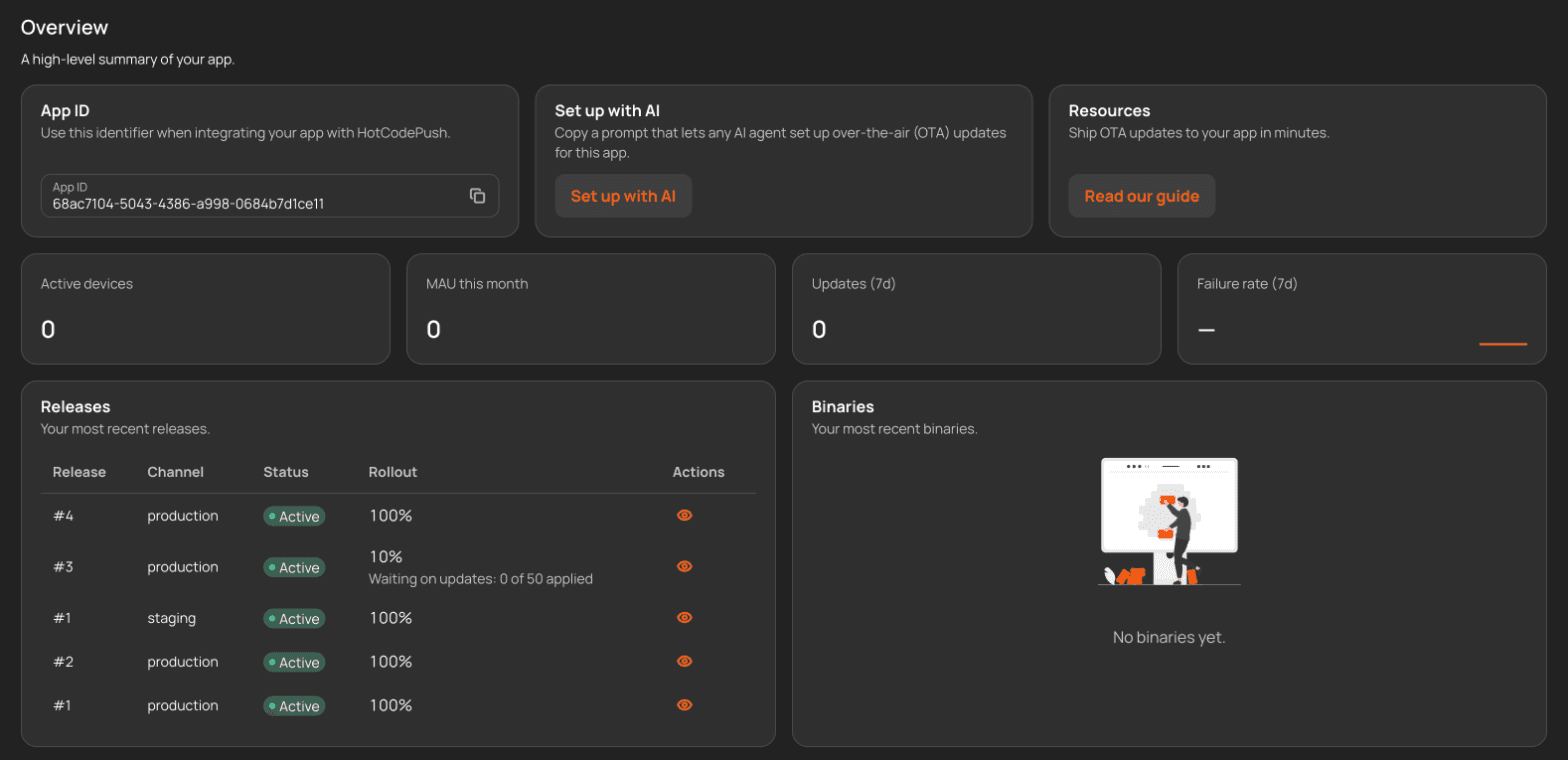
The app overview in the console after a few test releases, with the 'Set up with AI' card at the top.
With everything wired, a release is npm run build followed by npx hotcodepush release create. On Capacitor the CLI packages your webDir as a single bundle that serves both iOS and Android. My first release (I'd padded the build with a few images to get it to 2.5 MB, closer to a real app) went from command to "Live" in 26 seconds, signed with my key.
Each bundle picks up its git provenance automatically. The console's release log shows the commit subject, the short SHA and the branch next to every release, and it flagged my second release as "Dirty" because I'd released from uncommitted changes. That's a small detail, but it's precisely the one you want when you're trying to work out which code is running on someone's phone.
Before releasing, --dry-run tells you the audience a release would reach without uploading or signing anything. On my empty test app it naturally answered "reaches 0 of 0 active devices", but on a live app that sentence is the sanity check you want before a Friday afternoon fix.
A channel is the stream of releases a group of devices follows. Every app starts with production, and you add more from the CLI or the console. I created a long-lived staging channel, plus a pr-42 channel with --expires-in 14d, which is the pattern HotCodePush suggests for one preview channel per pull request. The console listed it as expiring "in 13 days" next to staging and production, which never expire.
The workflow I tested was the one most teams will want: release to staging, check it, then promote. I shipped a 1.1.0 bundle to staging, then ran release create --from-channel staging --channel production. Nothing was rebuilt or re-uploaded. Production simply got a new release pointing at the same bundle staging had just tested, live 17 seconds later. That is the right design, because what you promote is byte for byte what your testers saw.
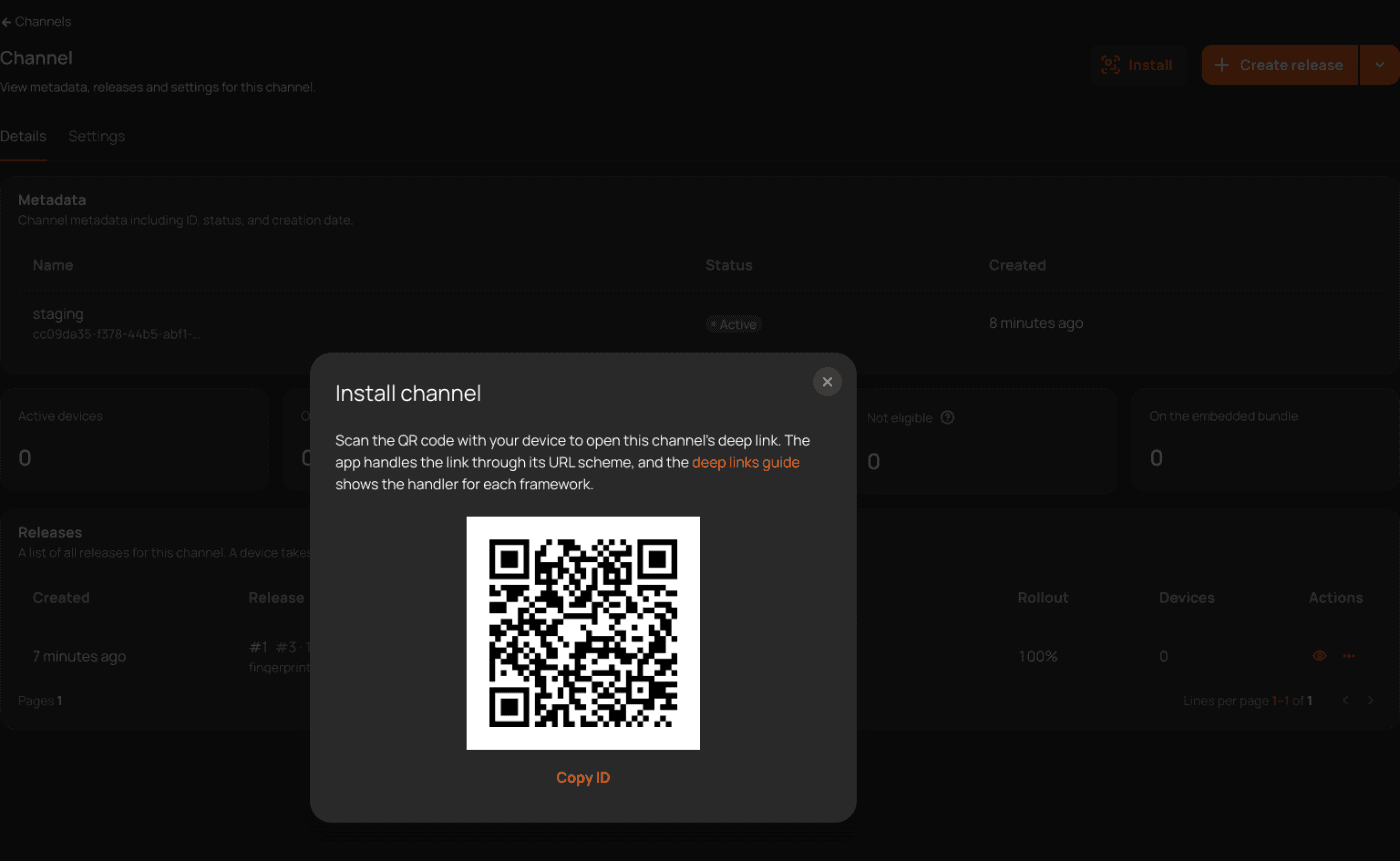
Getting testers onto a channel is handled with deep links. Once I'd set a channel link template in the app settings (uneedota://preview/{channelId} for my test), every channel page grew an Install button that shows a QR code. A tester scans it, your app's URL handler calls setChannel, and that phone now follows staging instead of production. You do have to add that handler to your app yourself, and the docs give a snippet per framework.
The Install dialog on the staging channel, with the QR code testers scan to switch their build to it.
Channels can also be paused as a kill switch for a whole stream, marked as protected so only Owners and Admins can change what they serve, or made discoverable so the app can switch to one by name.
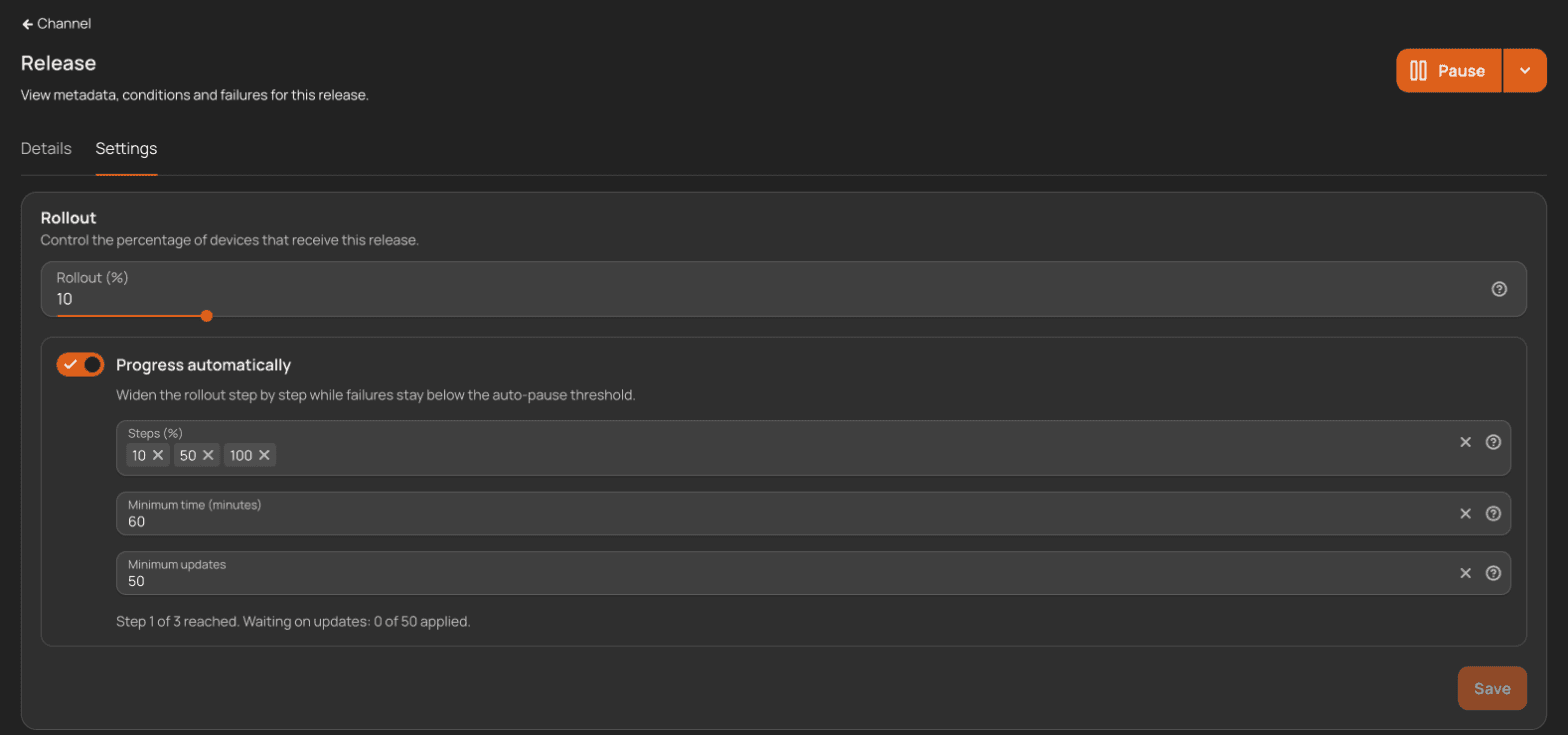
Promoting to production is where the safety features show up. I added --progression to the promotion, and HotCodePush answered "Rollout 10 percent, then 50 and 100". On the release's Settings tab in the console, a "Progress automatically" toggle shows the steps (10, 50, 100), the minimum time per step (60 minutes) and the minimum number of applied updates per step (50), with the current state spelled out underneath: "Step 1 of 3 reached. Waiting on updates: 0 of 50 applied."
A release's Settings tab: rollout at 10%, automatic progression through 10, 50 and 100 percent, waiting on its first 50 applied updates.
Alongside it, auto-pause is on by default for every release: if failed updates cross 5% of applied ones (after at least 50 updates, so one broken test phone can't pause production), the release stops being offered. You can change that per channel or per release to revoke, notify or do nothing. With no devices in my test app, I couldn't watch auto-pause fire, so take that part as documented rather than observed.
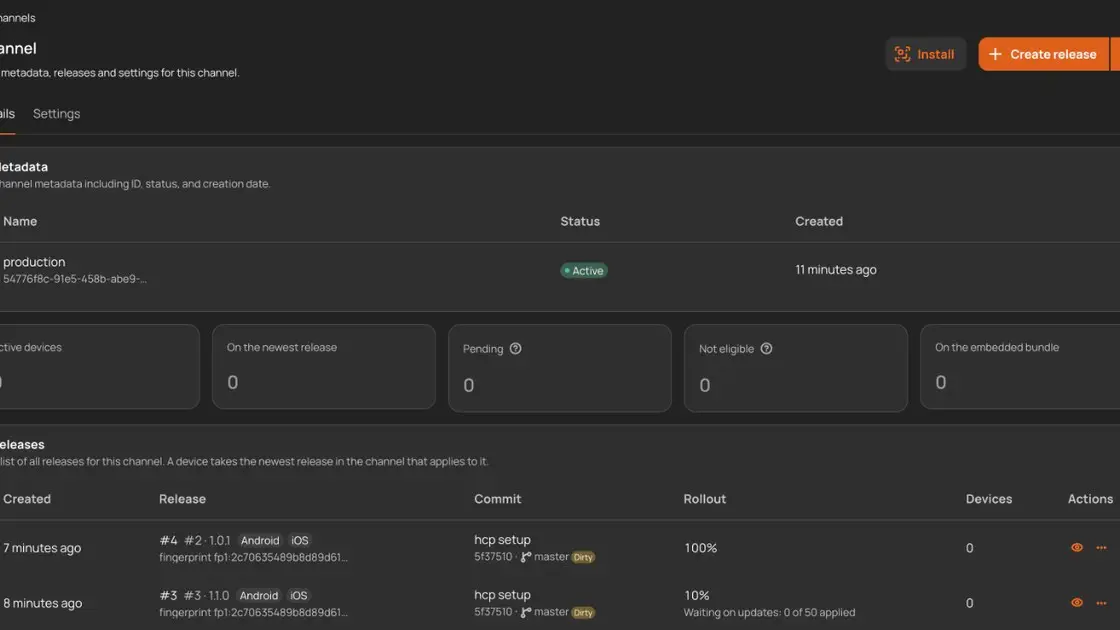
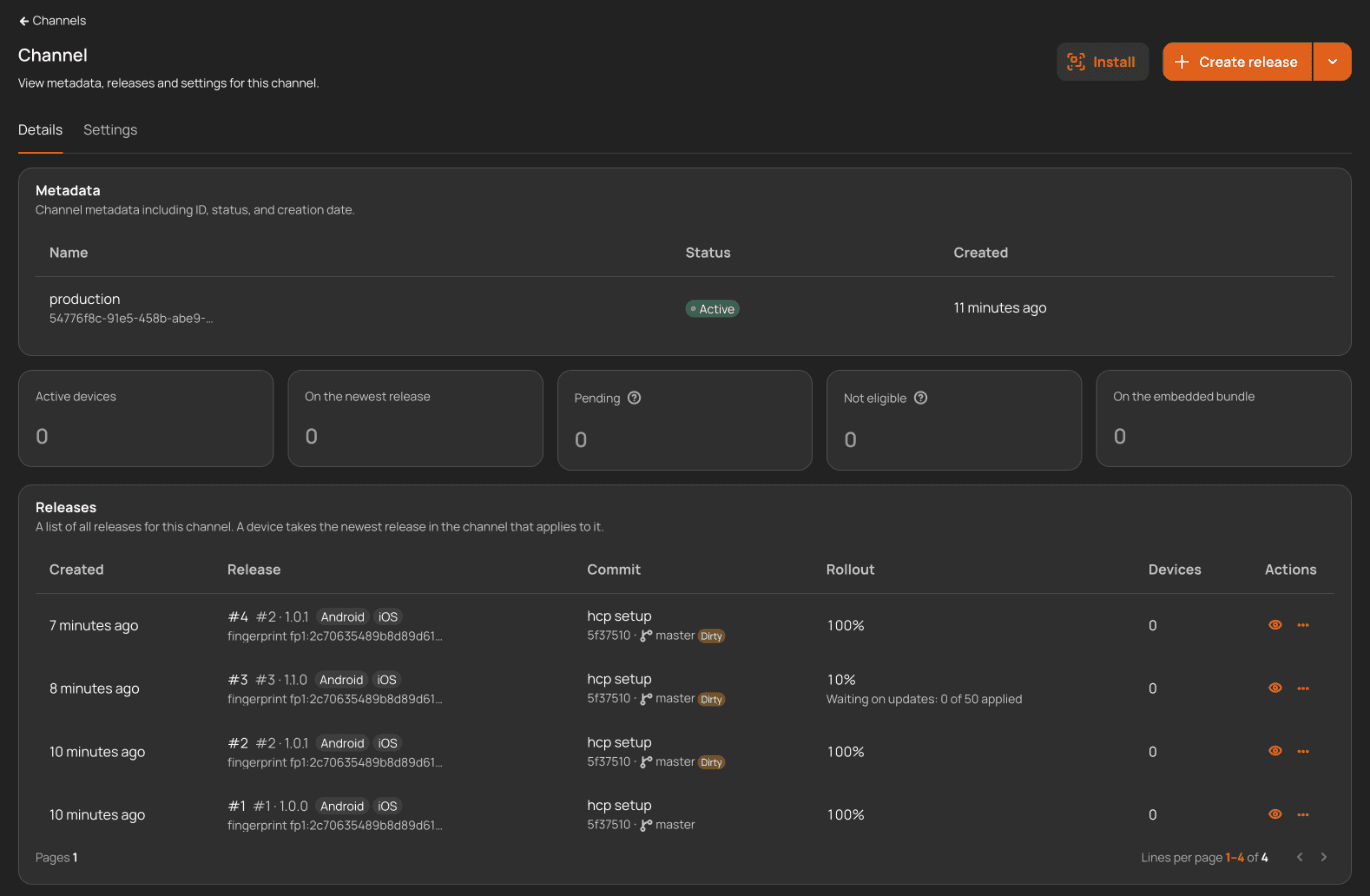
What I could test is the manual escape hatch. hotcodepush release rollback --channel production created release #4 pointing back at the previous bundle in 15 seconds, and marked it mandatory by default, so devices apply it as soon as they download it rather than waiting for the next launch. Rolling back is itself a new release, which keeps the log honest: you can see exactly when production went back and to what.
The production channel's release log: the rollback as release #4, the staged 1.1.0 release at 10%, each with its commit and platforms.
On the device side, the docs describe a readiness gate on the first start of every update: if the app doesn't render (or call notifyReady()) in time, or crashes, the device reverts to its last good bundle and blocks that update. Paired with signing, a device only ever applies bytes you signed. I didn't get to see this on a handset, but I like that it's on by default, on every plan, rather than something you have to remember to enable.
This was the claim I most wanted to check, because "delta updates" can mean anything from a real diff to a marketing word. HotCodePush says a device fetches only the files it lacks, by hash, as a single archive.
So after my first 2.5 MB release, I changed one line of text in the app, rebuilt and released again. The SDK's protocol package is open source (MIT), which made it easy to see the exact URL a device calls to get the update from one bundle to the next. I requested it myself, the way a phone on version 1.0.0 would. The answer was an 8 KB archive containing exactly two files: the rebuilt JavaScript chunk and the index.html that references it. The four images, unchanged, weren't in it. The CLI's bundle get then listed that delta with its size (8,192 bytes) and its status, built on request in a few seconds.
So a user on 1.0.0 downloads 8 KB for that fix instead of 2.5 MB. On React Native and Expo, HotCodePush goes a step further and sends the main JavaScript bundle as a byte-level patch when that's smaller than the whole file. I tested Capacitor, so I can't vouch for the patch size there, but the file-level delta did exactly what it says.
For continuous delivery, the official route is the hotcodepush-team/release-action GitHub Action. It wraps the pinned CLI, masks your token and signing key, and every input maps to a release create flag under the same name: channel, rollout-percent, progression, dry-run, platform for React Native and Expo matrices, and so on. Its outputs give you the release id and number for later steps. I didn't run it in a real repository for this review, but it runs the very release create command I used throughout, and the docs carry ready-made recipes for GitLab, Bitbucket, Azure DevOps, Bitrise, Codemagic, EAS Build, Xcode Cloud and others too. There's also a preview-channel workflow that creates an expiring channel per pull request and posts the QR code as a comment.
The AI side is more unusual. HotCodePush runs a hosted MCP server, and I connected to it with my account. It exposed 33 tools to my session, covering apps, channels, bundles, releases, audiences and statistics. I listed production's releases, then paused and resumed the staged 1.1.0 release entirely through tool calls, each one answering with a plain "Release paused." or "Release resumed." and the release's details. When I got a parameter wrong, the server answered with a readable message (Unrecognized key: "channelId") rather than a protocol error, which is what an agent needs to correct itself. The documentation tools work without an account at all: a search for "migrate from Capgo channels" returned the right section of the Capgo migration guide.
Next to the server there are four agent skills in a public repository (init, release, debug a device that didn't update, and migrate from another tool), installable in one command or as a Claude Code plugin that bundles the MCP server. The console even has a "Set up with AI" card that copies a ready-made prompt. The whole documentation is also served as markdown, with an llms.txt index, which is a small thing that makes a big difference when you're asking an assistant about it.
Four SDKs:@hotcodepush/capacitor-live-updates, @hotcodepush/react-native-code-push, @hotcodepush/expo-ota-updates and @hotcodepush/cordova-code-push. On Capacitor and Cordova one release serves iOS and Android; on React Native and Expo you release per platform.
Compatibility by fingerprint: each release carries a fingerprint of the native layer it was built against, so an update never lands on a store build whose native code it would break. No "runtime version" to bump by hand.
Attribute targeting: set attributes like plan or tenant in the app, then release only to matching devices, with an audience preview before you publish.
Troubleshooting from the terminal:device probe fetches the live index the way a device would and explains, condition by condition, why a given phone didn't update.
Webhooks to Slack, Discord and Teams for releases, pauses and rollbacks, plus an OpenTelemetry export, a Node and Python API client, and an audit log.
Migration guides from CodePush, EAS Update, Capgo, Ionic Appflow, Capawesome Cloud and four others, each mapping commands, config keys and channels one to one.
HotCodePush has no plan tiers. There's a single meter, monthly active devices, with a free allowance that doesn't expire and doesn't need a card, then usage-based pricing above it. You set a spending cap yourself, and when it's reached devices simply keep the update they already have instead of breaking. Releases, bandwidth and storage aren't metered either, within fair use limits the docs spell out.
What I liked most is that every safety feature (signing, staged rollouts, auto-pause, rollback, preview channels) is on every plan, including the free one. Team features such as webhooks and the audit log come with paid usage, and an Enterprise option adds SSO, an SLA, a DPA and invoicing. The current figures are on the HotCodePush pricing page, which also has a slider to estimate your own bill.
React Native teams still looking for a CodePush alternative since App Center's retirement in March 2025
Capacitor and Ionic teams planning their move off Ionic Appflow, which shuts down at the end of 2027, or comparing Capacitor live updates providers
Expo teams who want an EAS Update alternative with signing and self-pausing rollouts included by default
Teams evaluating a Capgo alternative who care more about staged rollouts and CI tooling than self-hosting
Developers who already let an AI agent drive their releases and want an OTA service it can operate through MCP
If you build fully native apps in Swift or Kotlin, this isn't for you: OTA updates only ever touch the JavaScript and web layer. And if self-hosting is a hard requirement, Capgo's open source backend will suit you better, since HotCodePush runs as a hosted service (in the EU).
HotCodePush does the boring, important parts of over-the-air updates well. The setup is quick and repairable, releases are signed and carry their commit, staging-to-production promotion reuses the exact bundle you tested, and the delta I measured was 8 KB for a one-line change in a 2.5 MB app. The MCP server and agent skills aren't a gimmick bolted on top either: the tools map one to one to the CLI, and they behaved like it.
What I liked:
init wires the SDK, both native build steps and the import in seconds, and can be re-run to finish or repair a setup
Promotion with --from-channel ships the exact bundle staging tested, with no rebuild
A genuine file-level delta: 8 KB instead of 2.5 MB for a one-line change
Signing, staged rollouts, auto-pause and rollback are on by default on every plan
An MCP server with readable errors and docs that work without an account
Documentation that is precise, dated, and available as markdown
Things to keep in mind:
In --yes mode, init stops at the app step unless you pass --app, so the first unattended run doesn't finish on its own
signing-key create warns you to keep the private key out of version control but doesn't add it to .gitignore for you
Channel QR codes need a link template and a deep-link handler in your app before testers can use them
Automatic progression and auto-pause wait for real traffic (50 applied updates per step by default). You can lower that, but very small apps will mostly widen rollouts by hand
Hosted only: no self-hosted backend
If waiting on the store queue for a one-line fix sounds familiar, HotCodePush is worth the five minutes it takes to wire up.
Omnisend Review - Email and SMS Marketing Built Around Your Store
We've tested Omnisend, an email and SMS marketing platform for ecommerce that plugs into your store and runs welcome, abandoned cart and post-purchase automations, with AI helpers for subject lines and segments.
Reviews
Asin Review - An Amazon Price Tracker You Pay Per Check
We've tested Asin, an Amazon price tracker that checks products on 11 Amazon stores, keeps every price it reads, and emails you on drops, target prices and restocks, with a REST API and an MCP server on top.
Reviews
Phare Review - The European Alternative for Uptime Monitoring and Status Pages
We've tested Phare, a Better Stack alternative for uptime monitoring, incident management and status pages, built and hosted entirely in the EU.
Reviews
Orka Review - Live Chat for SaaS Founders Running Several Products
We've tested Orka, a live chat for SaaS founders that puts every product you run in one support inbox, with an AI that runs on your own API key.
We use cookies
Essential and analytics cookies keep Uneed running and help us understand usage, and a referral cookie credits the partner who sent you. Marketing cookies are optional. Privacy policy